
MAF
THROTTLE
BODY
FUEL
INJECTO
R
LAMBDA
SENSOR

ECU (Engine computer)

To catalytic converters
and exhaust system
Fresh air from air filter


MAF
THROTTLE
BODY
FUEL
INJECTOR
LAMBDA
SENSOR
ECU (Engine computer)
To catalytic converters
and exhaust system
Fresh air from air filter


Timm's BMW Engines - Diagnostics and Adaptations
What are they all about and how to fix engine running problems
This is a big subject - engine running problems and adaptations - especially ‘adaptations at limits’ which light up the engine warning lamp.
There is loads of advice on the Forums that say ‘you need diagnostics’ - but what do you actually do with diagnostics - and what do all
those values mean? This document is for those that have engine running problems and want to fix them with the help of diagnostics - in
this case we are using INPA. To get us going we are going to have to understand adaptations first!
ADAPTATIONS
Looking at the stored adaptation values gives us a good insight into the condition of the engine and the source of the problems you may
be having - so we are going to have to understand them first. And to do that we are going to look at a single cylinder of our engines and
ignore all the other sensors. All we are interested in is the basic fuel/air mixture which is provided by measuring air MASS (with a MAF
sensor) - the ECU (engine computer) then computes how long to open the injector for:
input 1 gram of air per rev
output 10ms injector duration
So, above is the very basic plan - measure the air input and decide on how long to open the injector - this happens every camshaft
revolution. The target is to get the fuel/air ratio correct because this provides efficient combustion and clean exhaust gasses.
But, it is pretty obvious that there are going to be errors, and early engines had an adjustment for the air measuring device (which was
an AIRFLOW METER rather than a MAF) so that you could compensate for wear, air leaks, blocked injectors and a myriad of other
possibilities. So - engine manufacturers added a way of checking the fuel/air mixture by using a Lambda (Oxygen) sensor.
The Lambda (Oxygen) Sensor saves the day
Ignoring all the subtleties, a good combustion will produce an Oxygen level at the exhaust that is equal to that of the surrounding air -
Lambda sensors measure the difference in Oxygen concentrations between the outside air and that in the exhaust. If the mixture is too
lean (not enough fuel) the fuel is all burnt before the available Oxygen is consumed - and if the mixture is too rich (too much fuel) then
all the Oxygen is consumed leaving unburnt fuel.
The Lambda’s used on the M60/M62/M62TUB engines are narrow band and inform the engine if the Oxygen level is too low - or too high
which relates to a mixture that is too rich or too lean respectively. But, these short-term deviations are not important, the ECU filters the
Lambda output to determine if the mean value is correct. (INPA will show you the live output from the Lambda sensors, you will see the
output swinging around - you will also see the integrated output which shows the filtered value).
So, let’s add the Lambda to the engine below, at the moment everything is Hunky Dory:

That’s spot-on mate!
input 1 gram of air per rev
output 10ms injector duration
There we go, we didn’t need that Lambda sensor after all - well until things wear and leak - let’s start with the
most obvious problem and the most common - air leaks

MAF
THROTTLE
BODY
FUEL
INJECTO
R
LAMBDA
SENSOR

ECU (Engine computer)

To catalytic converters
and exhaust system

Fresh air from air filter



That’s miles too lean - add more
fuel next time mate!
input 0.5 grams of air per rev
output 5ms injector duration
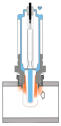
We’ve added an air-leak, if the leak was after the throttle body we would call it a vacuum leak. The Lambda system has noticed that the
Oxygen level is too high and that indicates the mixture is too weak. This is where Adaptations come into play. To compensate for the un-
metered air the ECU is going to increase the injector time (dwell) to richen the mixture.
This compensation is not immediate, instead, over thousands of engine revolutions the injector duration is slowly increased. These
compensations are called ADAPTATIONS and are stored in the ECU so that when the engine is re-started the information is available to be
used. Note: The M60 engine adaptations only remained when battery power was available - disconnecting the battery would clear all
adaptations (called a Magic Reset) - the M62 ECU stored Adaptations in Flash Memory and could not be simply erased.

Air leak at
manifold, PCV,
gaskets, boots
etc


•
Lambda-Probe Voltage - This is the raw output from the Lambda probe - in this case we are looking at Bank 1 which is right
hand bank (when viewed from behind the car). Lambda probes do nothing at all until they have reached operating temperature
and this value will stay stationary for a couple of minutes - it then should start moving around the scale. Due to the refresh rate of
the screen you will not see it move smoothly, nor will you see that it is actually a sinusoidal waveform - instead it will just seem to
flap around a bit.
When the engine is at operating temperature the Lambda sensor is informing the ECU of the remaining Oxygen level in the exhaust
- and that, in turn, indicates the initial air/fuel mixture. The M60/M62/M62TUB engines employ narrow band Lambda sensors which
mean they can only indicate a mixture is too weak or too lean. The ECU continually makes small adjustments to the injector dwell
in response to the raw Lambda output - for example, the Lambda will report that the mixture is too weak and the ECU will increase
injector dwell (the time it is open) - it does this in tiny increments - until the Lambda signal ‘flops’ high indicating that the mixture
is too rich.
This behaviour is normal operation for all models with narrow-band Lambda sensors. Later models with the N62 engine variants
have wide band Lambda sensors and they behave completely differently reporting absolute Oxygen levels and don’t flop about.
On both types, a zero value indicates that the sensor has failed short-circuit and the ECU will store an error message. In this
situation the ECU ignores the Lambda value and instead uses other sensors (such as the throttle position sensor and MAF readings)
to estimate the correct air/fuel mixture.
Lambda sensor rarely fail, but are replaced in their thousands because diagnostics will show a Lambda error of some sort - which
is akin to replacing temperature sensors if the engine is running hot. Later models could report ‘Lambda Ageing’ error codes which
was an indication that they were responding slowly to Oxygen levels - and that was usually because they were covered in soot.
•
Monitor Probe 1 After KAT - some models have additional Lambda sensors AFTER the catalytic converters. These monitor the
performance of the catalytic element which should be storing Oxygen when it is plentiful, and releasing it when the Oxygen levels
drop below that of atmospheric levels. What you expect to see at this point is a slight change in Oxygen levels which will follow the
pre-cat sensor (but delayed by the Oxygen-holding capacity of the catalytic element) - but at a much lower amplitude. If the
catalytic converter has failed this sensor will follow the pre-cat sensors at the same amplitude - the ECU would then decide the
catalytic element had failed and bung up an error code. Models such as the E31 don’t have these fitted and the value stays
stationary at around 0.8V. The values reported do not affect the air/fuel ration - although a blocked cat does!
•
Lambda Intergrator - This is the filtered and integrated output from the pre-cat Lambda sensor. The raw sinusoidal output from
the sensor is low-pass filtered and then referenced to a value of 0. What all that blurb means is that if the fuel/air mixture is
correct then we would expect to see a value of around 0.00 here. A higher value indicates a LEAN mixture, a lower value indicates
a RICH mixture - it’s as simple as that! This flops all over the place as the Lambda sensors reach operating temperature so ignore
that bit, once the engine has reached operating temperature this will change value by small amounts but centre around 0.00
If the adaptations were deleted we would expect this value to deviate from 0.00 (unless the engine was absolutely perfect) - and
we would expect to see the adaptations slowly changing in value until we get to a point where the adaptations have managed to
get this value back to 0.00. If this does not happen then the ECU will report ‘adaptations at limits’ and bung on the check engine
warning lamp.
•
Adaption Value Additive - If the Lambda Integrator reports that the mixture is too lean (at
idle) then the ECU will slowly increase this value to increase the injector dwell so that the
mixture enriches. If you have a value here that it greater than +10 you can be sure you have
a vacuum leak - or the MAF is mis-reporting the actual air mass.
If the value here moves to less than -10 (especially if combined with a negative value for the
multiplicative adaptations) that usually points to a failure of the vacuum pipe that runs
between the PCV and the Fuel Pressure Regulator (FPR) - at idle the PCV will be supplying a
vacuum to the FPR which limits the fuel-rail pressure to 3.0 Bar - if that vacuum is missing
(the pipe is kinked, torn or missing) then the fuel-rail pressure will increase to 3.5 Bar and
adaptations will be seriously skewed trying to pull the fuel/air mixture back to the correct
levels. A slightly negative reading indicates less than perfect combustion (plugs, coils)
•
Adaption Value Multiplicative - This value is modified if the mixture is not ideal at higher engine loads and speeds (when
cruising for instance). If this one moves to far away from 1.00 then things are not right - a vacuum leak is much less likely as the
manifold vacuum reduces with engine load and that proportionally reduces its influence. However, a large additive and small
multiplicative positive increase does point towards an air or vacuum leak.
A large negative number here could be excessive fuel-rail pressure - but it could also be poor combustion in one or more cylinders
- the smoothness values would help us differentiate the two possibilities
SMOOTHNESS
(also know as roughness on some models)
Practical measurements using INPA diagnostics
The three important screens that will find most running problems
ANALOG VALUES 2
Lambda Sensors and Adaptation values
Right, we know what Adaptations are now - they are values learnt by the ECU to compensate for imperfections, and that includes
imperfections with the sensors as well as mechanical problems such as air and vacuum leaks. Let’s have a look at an INPA screenshot
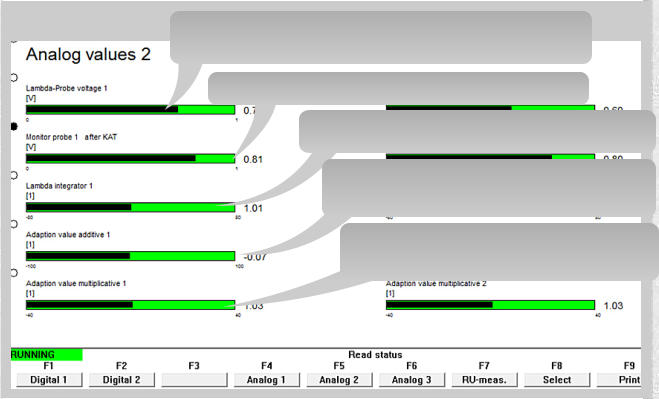
(Analog value 2) from an M62TUB44 after it has reached operating temperature (I’ve annotated Bank 1):
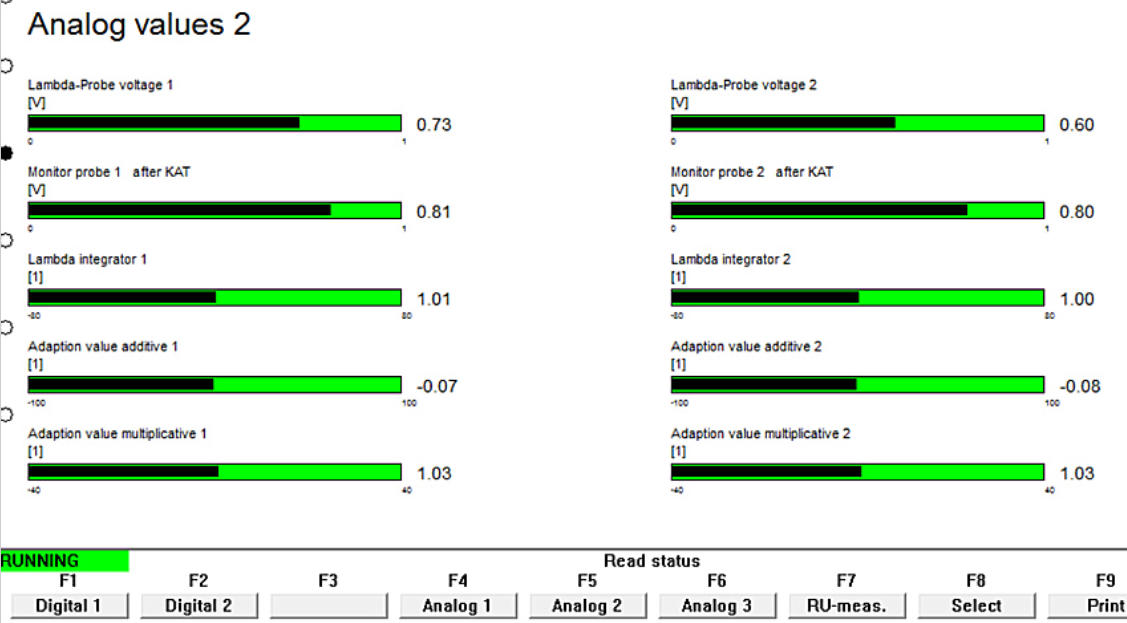

RAW output from the Lambda sensor BEFORE the catalytic converter. This is a measurement of
the remaining Oxygen in the exhaust gasses and indicates the fuel/air mixture before combustion
This (should) constantly change in voltage (0.2V - 0.9V)

Raw output of Lambda AFTER the catalytic converter - this effectively measures catalytic
converter condition. We will ignore this value as it has no bearing on adaptations

Integrated Lambda signal, it is an indication of fuel/air mixture with less flopping
about - if the mixture is correct this will settle at around 0. A positive value indicates a
LEAN mixture. With a stable mixture this value should move around a zero value

Additive Adaptation - How much injector dwell is ADDED or SUBTRACTED
So, (say) 10ms + 1ms injector dwell.
This is example is close enough at 0.07

Multiplicative Adaptation - How much the injector dwell is MULTIPLIED by
So, (say) 10ms injector dwell x 2 = 20ms
This is example is close enough at 1.03
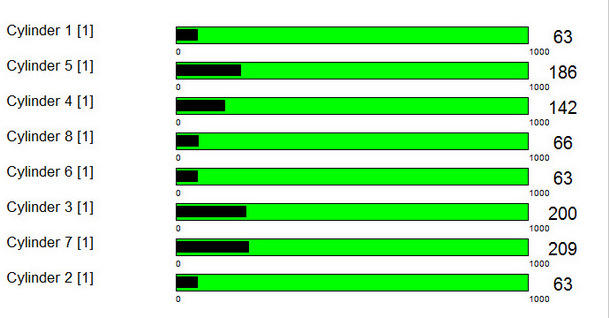
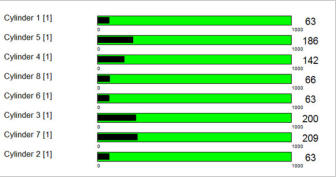
The SMOOTHNESS VALUE is an indication of the
consistency of providing crankshaft acceleration at idle for
each cylinder. If that effort was the same every camshaft
revolution then the value would stay at ZERO (a completely
dead cylinder will give a zero reading)
As cylinder combustion is never perfect you will get
differing levels of effort being made for the same cylinder -
the greater that difference the higher the smoothness value
(a dodgy cylinder will give a higher reading)
This example is of a healthy engine, lower values can be
seen, especially if you restart diagnostics when the engine
is running (usually the source of ‘my engine is very
smooth’ screenshots online!)
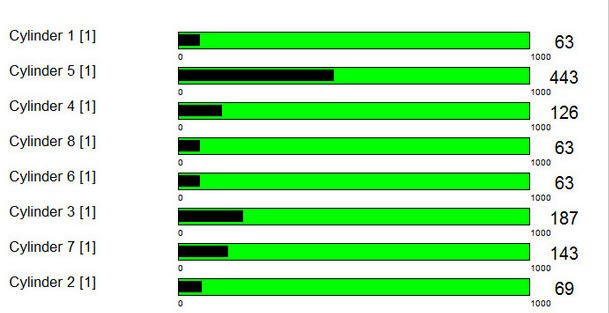
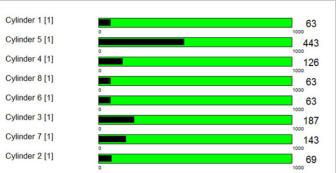
The screenshot above is from my 840ci, and so is the one on
the left, but before I fixed all sorts of vacuum leaks.
The smoothness and Lambda screens showed that things
were not happy - my first plan was to swap coils around (as it
is easy to do) to see if cylinder 5 would perk up a bit - but it
didn’t, so I could discount ignition problems
It was the combination of Smoothness and Adaptations that
pointed towards a vacuum leak - using the Smoothness
values ruled out a dodgy ignition coil



MAF
THROTTLE
BODY
FUEL
INJECTO
R
LAMBDA
SENSOR

ECU (Engine computer)

To catalytic converters
and exhaust system

Fresh air from air filter



That’s spot-on mate!
input 0.5 grams of air per rev
output 5ms injector duration
PLUS ADDITIVE ADAPTATION of 5ms
That’s basic adaptation at work - although the MAF measured only 0.5 grams of air per revolution the ADAPTATIONS have requested an additional 5ms injector
duration. It took quite a while for adaptations to work themselves up to this point (if a large air-leak is introduced it may take ten minutes at idle for adaptations
to pull the mixture back correctly). But, now the fuel/air mixture is correct (but only at this engine speed and load) and all is jolly.
The EVIDENCE that something is wrong is that the Additive adaptations will be quite noticeable - if the air-leak was large enough (like this example is) then you
will get an engine warning lamp lit and INPA will show ‘adaptations at limit’. However, as long as the ECU has done its job correctly there should be no misfire, the
engine will be as smooth as normal as the mixture is now correct again.
Additive and Multiplicative Adaptations
I’ve seen a couple of documents regarding when these two adaptation types are modified - the blurb says:
•
Additive adaptations are made at IDLE, LOW LOAD and LOW TO MID RANGE ENGINE SPEEDS
•
Multiplicative adaptations are made at NORMAL TO HIGHER LOADS when at HIGHER ENGINE SPEEDS
But, my experience of the M62B44 shows that the Multiplicative adaptations can be modified at idle when the Additive adaptations reach their limits, so I’m not
sure if the above information is perfectly true! But, it is probably close enough for our purposes. As far as their effects on engine performance is concerned, we
can broadly say that:
•
The Additive adaptations have more effect at idle and only slightly modify the cruising and acceleration performance.
•
The Multiplicative adaptations affect every aspect of engine performance and that includes idle

Air leak at
manifold, PCV,
gaskets, boots
etc


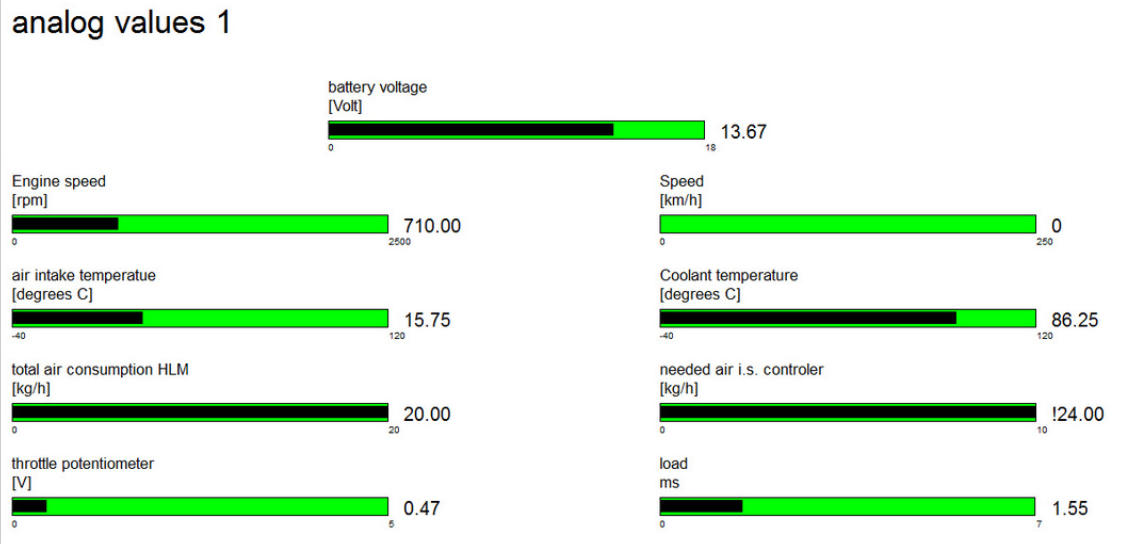
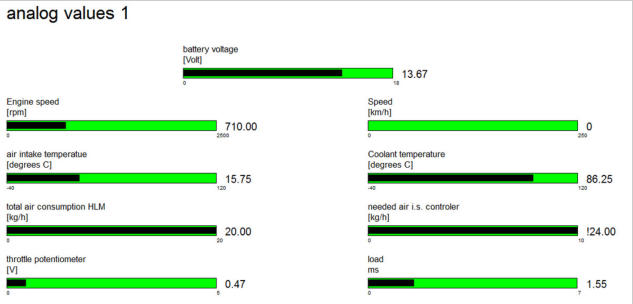
This is the correct temperature
when the M62 is fitted to an E31 -
The E38 has a mapped thermostat
and at idle the temperature should
be 105C - 108C

The ECU has
calculated that the
ICV (Idle-speed
Control Valve)
needs to open
sufficiently to pass
24Kg/h - this value
causes much angst
as it often has the
(!) warning - but
this value is within
limits

Total air consumption
On the V8’s it should be
around 20Kg/h as seen here.
When the engine is cold it is
normal to get a warning (!) -
the slider scale was designed
for lesser engines!

This engine speed is
normal if A/C is ON - if
A/C is OFF it should be
around 550-600 RPM

Don’t bother diagnosing
problems if the running
voltage is less than 12.6V
The screen above is always a good place to start when things aren’t running nicely - it gives a good indication of the basic sensors:
•
Battery Voltage - with the engine running we expect a voltage between 12.6V to 14.6V. Anything below 12.6V means that
something is wrong with the alternator and low voltages will cause ignition problems - so get that bit fixed first!
•
Engine Speed - On the M60, M62 and M62TUB the engine revs should be 550 - 600 with the A/C OFF. If the A/C is switched ON
and working then the revs should increase to 700.
•
Air Intake Temperature - On the M60 engine this temperature sensor is stuck on the RHS of the intake manifold, on the M62
engine it is incorporated into the MAF - although on some models there is an additional sensor on the air filter housing. The
reported temperature should be around the ambient temperature plus a few degrees. If the temperature is mis-reported this will
cause the adaptations to move away from the ideal. Replace the MAF if the error is more than five or six degrees out. However, on
the N62 engines this value is often much higher even on new MAF’s.
•
Coolant Temperature - This is the coolant temperature of the ENGINE. On some models the radiator outlet temperature is also
reported - we are not interested in that when finding engine running problems. The engine must be at running temperature for
basic diagnostics. Although the M62 engine is used across a few models, the coolant temperature is lower when used in the E31 as
this has a fixed 85C thermostat - whereas the E38 and E39 have a temperature-mapped thermostat with a passive opening
temperature of 104C - at idle the reported temperature would be around this value. When performing diagnostics (unless you are
looking for cold-start problems) it is imperative that the engine reaches operating temperature - and if the engine fails to reach the
thermostat opening temperature then that could well be the source of the engine performance problems
•
Needed Air I.S. Controller - On the M60 and M62 (not the TUB version) the idle speed is controlled by an Idle-speed Control Valve
(ICV). The ECU calculates how much air this has to allow through it to maintain the correct idle speed. This is the Needed air i.s.
controller value. Unfortunately the scale (just like that of the Total Air Consumption slider) is too short for the mighty V8’s and
although everything is working perfectly you often (nearly always) get the (!) warning next to it. Don’t panic, this is perfectly
normal for the V8’s
•
Total Air Consumption HLM - This is the airflow that the MAF is reporting. This often causes angst because a warning (!) is
shown. But, as long as this value is around 20Kg/h - 25Kg/h then everything is fine for the V8’s. Just like the previous slider, the
scale seems to have been made too short for the larger engines. If diagnosing the car from cold this value will be much higher and
the warning (!) will be shown, again, this is perfectly normal. The lack of a value here means that the MAF is not connected or has
failed. If the value is less than 18Kg/h when the engine is hot that will indicate a vacuum leak, possibly around the inlet manifold.
Readings that are absolutely miles out usually indicate a failed MAF
•
Throttle Potentiometer - this is the voltage reported from the throttle position sensor which is fitted to the throttle body on the
M60 and M62. The M62TUB has a motorised throttle body (as does the N62) but this value has been retained and is interpreted
from the EML system rather than directly from the throttle body. A voltage around 0.45V is expected - plus or minus 0.1V. As the
throttle is pressed this value will increase. Due to the refresh rate of the diagnostic screen the value will move in a jerky fashion -
unless the value jumps backwards as the throttle is increased then the potentiometer is probably OK.

On the M60 and M62 this value is reported from the throttle body
potentiometer. This value will move if the throttle is opened -
around 0.45V is expected at idle
ANALOG VALUES 1
Primary and secondary engine sensors
OPEN - LOOP MIXTURE
CONTROL
CLOSED - LOOP MIXTURE
CONTROL
AIR LEAK
INTRODUCED
ADAPTATIONS
COMPENSATE
HOW ENGINE PROBLEMS AFFECT THE READINGS
So, we know a lot more about how to use diagnostics and what each of the screens can show us if we have an engine running problem.
Obviously, if you have a part of the engine that has completely died (such as a coil-pack) then error codes are stored, and then repair is
straightforward - and you probably won’t be reading this. But, when parts sort of work but not properly then these three screens will help
us whittle the possibilities down. Let’s have a quick look at problems and how they affect the readings.
•
Oil in the sparkplug wells (details and repair information here)
This problem causes misfires on single cylinders rather than an overall lumpiness of all 8 cylinders. If the coil completely failed we
would find a stored error code, and the ECU would inhibit the injector on that cylinder to stop unburnt fuel getting to the catalytic
converters. But where it fires feebly and intermittently we can find evidence on both Adaptations and Smoothness. We would expect to
see an increase in the smoothness value for that cylinder AND the Additive Adaptations would be below zero as they
compensated for the partially combusted fuel
•
Failing catalytic converter (details and repair information here)
Catalytic converters can fail in a way that blocks the flow of exhaust gasses - either by melting or disintegrating. When they
disintegrate parts of the honeycomb can become detached and block the outlet from the converter casing. In this situation the error
happens quite quickly, the car starts shaking and power is lost - but when the car is stopped the errant bit of honeycomb of falls away
from the outlet and all is good when re-started. Where the honeycomb melts the exhaust flow is reduced and so is engine power - but
the evidence it leaves is quite noticeable. This is one of the few errors that shows adaptations completely different between the
two Banks - one will be positive, the other negative. The reason for this is that we only have one MAF - and two banks. If the flow
of gasses is inhibited on one bank then that bank becomes richer, and the other leaner. It is also possible to get knock sensor error
codes when things get badly blocked.
•
Vacuum leaks around the manifold gaskets (details and repair information here)
Manifold leaks can affect the smoothness of single cylinders and adjacent cylinders along with an increase of Additive
Adaptations. This is due to the construction of the gaskets which serve two adjacent cylinders and the design of the one-piece inlet
manifold. The difference between faulty coil packs and manifold leaks is that the latter increases Additive Adaptations whereas a faulty
coil pack (well, until it gives up completely) reduces the adaptations.
•
Fuel pressure regulation problems (details mentioned in this article)
The TIS always mentions fuel-rail pressure as the first thing that is checked if you have engine running problems. But, as a general
rule they are pretty well behaved. But they do two things that really upset the engine. They can leak internally and that pushes raw
fuel directly into the manifold via the vacuum pipe that runs between the FPR and the PCV. That makes starting the engine difficult as
the manifold is flooded - but as far as diagnostics go it pushes the Additive Adaptations negative and affects the Multiplicative
Adaptations in a much lesser way. If the pipe is removed it will be found to be wet with fuel.
The pipe between the FPR and the PCV can be punctured and this has the effect of increasing fuel-rail pressure to 3.5 Bar (instead
of 3 Bar) and that will increase the amount of fuel that is added in all engine ranges except full throttle. In this situation Additive
Adaptations will be very negative and Multiplicative Adaptations will be negative to a lesser extent. A quick check for this
problem is to pinch the vacuum pipe and remove the FPR end - if the engine note does NOT change the pipe is blocked, puncture or
the FPR is faulty.
•
Vacuum leaks on external manifold parts (details and repair information here)
These leaks can be around the throttle body, around the PCV gasket, the vacuum lines to the brake booster and then capped off
service ports as mentioned in the article above. These leaks are easily compensated for by adaptations and the clue is that Additive
Adaptations are positive, and Multiplicative Adaptations are positive to a much lesser extent. Quite often the engine is
perfectly happy until the adaptations reach their limits.
•
MAF problems (discussed here)
The MAF always gets the blame - and the usual advice is to disconnect it and see if the engine runs better - and it quite often does.
With the MAF disconnected the other sensors take the primary role - the throttle potentiometer being the primary airflow sensor. But,
if you want to do this test correctly - switch off the car, ignition back ON, use diagnostics to clear the engine adaptations, disconnect
the MAF, switch the ignition OFF and then re-start the car - how’s it running now? Using this method will show if the default engine
values give good performance, and if they do the MAF is suspect. If the engine runs badly then the fault is elsewhere.
Faulty MAF’s can cause all sorts of problems - but the signature of a failed MAF is very high adaptations, quite often with Additive
Adaptations being negative and Multiplicative Adaptations being positive. There is often a lack of performance, especially under
harsh acceleration where the Lambda sensor has no effect at all.
•
PCV failure (details and repair information here)
Not all PCV failures cause smoke, some just let lots of un-metered air in (they usually make a whistling noise at the same time).
Sometimes they just let a small amount of air in and these leaks are easily compensated for by adaptations and the clue is that
Additive Adaptations are positive, and Multiplicative Adaptations are positive to a much lesser extent. Quite often the engine
is perfectly happy until the adaptations reach their limits. However, they usually get worse to a point where you get several misfires,
especially on a cold start.



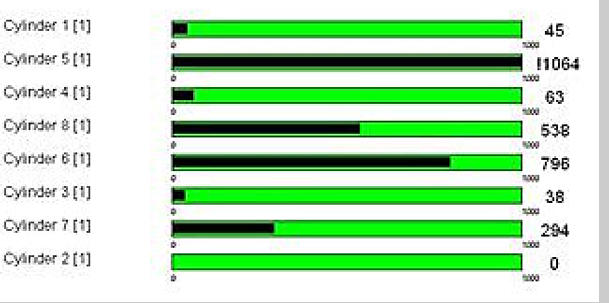
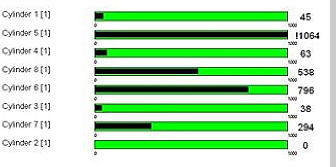
That’s obviously not right at all! I trawled this from the
internet as an example. I would expect that the Adaptations
were at limits on this example as cylinder 5 is hardly firing
consistently. Where a cylinder fires inconsistently there will
be unburnt fuel getting to the Lambda sensor - the ECU will
try and lean-out the mixture but that will start to affect the
other cylinders
This example is quite interesting as Bank 2 (cylinders 5 - 8)
is badly affected whereas Bank 1 (cylinders 1 - 4) look
pretty happy - although the value of zero on cylinder 2
probably means it’s not doing anything at all. I would try
and get cylinder 2 firing again - but my best guess is that
the catalytic converter is blocked on Bank 2
SEARCH MEEKNET
SEARCH MEEKNET








MAF
THROTTLE
BODY
FUEL
INJECTOR
LAMBDA
SENSOR

ECU (Engine computer)

To catalytic converters and
exhaust system

Fresh air from air filter


MAF
THROTTL
E BODY
FUEL
INJECTOR
LAMBDA
SENSOR

ECU (Engine computer)

To catalytic converters
and exhaust system

Fresh air from air filter




Timm's BMW Engines - Diagnostics
and Adaptations
What are they all about and how to
fix engine running problems
This is a big subject - engine running problems and adaptations -
especially ‘adaptations at limits’ which light up the engine warning lamp.
There is loads of advice on the Forums that say ‘you need diagnostics’ -
but what do you actually do with diagnostics - and what do all those
values mean? This document is for those that have engine running
problems and want to fix them with the help of diagnostics - in this case
we are using INPA. To get us going we are going to have to understand
adaptations first!
ADAPTATIONS
Looking at the stored adaptation values gives us a good insight into the
condition of the engine and the source of the problems you may be
having - so we are going to have to understand them first. And to do that
we are going to look at a single cylinder of our engines and ignore all the
other sensors. All we are interested in is the basic fuel/air mixture which
is provided by measuring air MASS (with a MAF sensor) - the ECU
(engine computer) then computes how long to open the injector for:
input 1 gram of air per rev
output 10ms injector duration
So, above is the very basic plan - measure the air input and decide on
how long to open the injector - this happens every camshaft revolution.
The target is to get the fuel/air ratio correct because this provides
efficient combustion and clean exhaust gasses.
But, it is pretty obvious that there are going to be errors, and early
engines had an adjustment for the air measuring device (which was an
AIRFLOW METER rather than a MAF) so that you could compensate for
wear, air leaks, blocked injectors and a myriad of other possibilities. So -
engine manufacturers added a way of checking the fuel/air mixture by
using a Lambda (Oxygen) sensor.
The Lambda (Oxygen) Sensor saves the day
Ignoring all the subtleties, a good combustion will produce an Oxygen
level at the exhaust that is equal to that of the surrounding air - Lambda
sensors measure the difference in Oxygen concentrations between the
outside air and that in the exhaust. If the mixture is too lean (not
enough fuel) the fuel is all burnt before the available Oxygen is
consumed - and if the mixture is too rich (too much fuel) then all the
Oxygen is consumed leaving unburnt fuel.
The Lambda’s used on the M60/M62/M62TUB engines are narrow band
and inform the engine if the Oxygen level is too low - or too high which
relates to a mixture that is too rich or too lean respectively. But, these
short-term deviations are not important, the ECU filters the Lambda
output to determine if the mean value is correct. (INPA will show you
the live output from the Lambda sensors, you will see the output
swinging around - you will also see the integrated output which shows
the filtered value).
So, let’s add the Lambda to the engine below, at the moment everything
is Hunky Dory:

That’s spot-on mate!
input 1 gram of air per rev
output 10ms injector duration
There we go, we didn’t need that Lambda sensor after all - well until
things wear and leak - let’s start with the most obvious problem and the
most common - air leaks


MAF
THROTTL
E BODY
FUEL
INJECTOR
LAMBDA
SENSOR

ECU (Engine computer)

To catalytic converters
and exhaust system

Fresh air from air filter




That’s miles too lean - add
more fuel next time mate!
input 0.5 grams of air per rev
output 5ms injector duration
We’ve added an air-leak, if the leak was after the throttle body we would
call it a vacuum leak. The Lambda system has noticed that the Oxygen
level is too high and that indicates the mixture is too weak. This is where
Adaptations come into play. To compensate for the un-metered air the
ECU is going to increase the injector time (dwell) to richen the mixture.
This compensation is not immediate, instead, over thousands of engine
revolutions the injector duration is slowly increased. These
compensations are called ADAPTATIONS and are stored in the ECU so
that when the engine is re-started the information is available to be
used. Note: The M60 engine adaptations only remained when battery
power was available - disconnecting the battery would clear all
adaptations (called a Magic Reset) - the M62 ECU stored Adaptations in
Flash Memory and could not be simply erased.

Air leak at manifold,
PCV, gaskets, boots
etc



•
Lambda-Probe Voltage - This is the raw output from the Lambda
probe - in this case we are looking at Bank 1 which is right hand bank
(when viewed from behind the car). Lambda probes do nothing at all
until they have reached operating temperature and this value will stay
stationary for a couple of minutes - it then should start moving around
the scale. Due to the refresh rate of the screen you will not see it move
smoothly, nor will you see that it is actually a sinusoidal waveform -
instead it will just seem to flap around a bit.
When the engine is at operating temperature the Lambda sensor is
informing the ECU of the remaining Oxygen level in the exhaust - and
that, in turn, indicates the initial air/fuel mixture. The M60/M62/M62TUB
engines employ narrow band Lambda sensors which mean they can only
indicate a mixture is too weak or too lean. The ECU continually makes
small adjustments to the injector dwell in response to the raw Lambda
output - for example, the Lambda will report that the mixture is too
weak and the ECU will increase injector dwell (the time it is open) - it
does this in tiny increments - until the Lambda signal ‘flops’ high
indicating that the mixture is too rich.
This behaviour is normal operation for all models with narrow-band
Lambda sensors. Later models with the N62 engine variants have wide
band Lambda sensors and they behave completely differently reporting
absolute Oxygen levels and don’t flop about.
On both types, a zero value indicates that the sensor has failed short-
circuit and the ECU will store an error message. In this situation the
ECU ignores the Lambda value and instead uses other sensors (such as
the throttle position sensor and MAF readings) to estimate the correct
air/fuel mixture.
Lambda sensor rarely fail, but are replaced in their thousands because
diagnostics will show a Lambda error of some sort - which is akin to
replacing temperature sensors if the engine is running hot. Later models
could report ‘Lambda Ageing’ error codes which was an indication that
they were responding slowly to Oxygen levels - and that was usually
because they were covered in soot.
•
Monitor Probe 1 After KAT - some models have additional Lambda
sensors AFTER the catalytic converters. These monitor the performance
of the catalytic element which should be storing Oxygen when it is
plentiful, and releasing it when the Oxygen levels drop below that of
atmospheric levels. What you expect to see at this point is a slight
change in Oxygen levels which will follow the pre-cat sensor (but
delayed by the Oxygen-holding capacity of the catalytic element) - but
at a much lower amplitude. If the catalytic converter has failed this
sensor will follow the pre-cat sensors at the same amplitude - the ECU
would then decide the catalytic element had failed and bung up an error
code. Models such as the E31 don’t have these fitted and the value
stays stationary at around 0.8V. The values reported do not affect the
air/fuel ration - although a blocked cat does!
•
Lambda Intergrator - This is the filtered and integrated output from
the pre-cat Lambda sensor. The raw sinusoidal output from the sensor is
low-pass filtered and then referenced to a value of 0. What all that blurb
means is that if the fuel/air mixture is correct then we would expect to
see a value of around 0.00 here. A higher value indicates a LEAN
mixture, a lower value indicates a RICH mixture - it’s as simple as that!
This flops all over the place as the Lambda sensors reach operating
temperature so ignore that bit, once the engine has reached operating
temperature this will change value by small amounts but centre around
0.00
If the adaptations were deleted we would expect this value to deviate
from 0.00 (unless the engine was absolutely perfect) - and we would
expect to see the adaptations slowly changing in value until we get to a
point where the adaptations have managed to get this value back to
0.00. If this does not happen then the ECU will report ‘adaptations at
limits’ and bung on the check engine warning lamp.
•
Adaption Value Additive - If the
Lambda Integrator reports that the
mixture is too lean (at idle) then
the ECU will slowly increase this
value to increase the injector dwell
so that the mixture enriches. If you
have a value here that it greater
than +10 you can be sure you have
a vacuum leak - or the MAF is mis-
reporting the actual air mass.
If the value here moves to less than
-10 (especially if combined with a
negative value for the multiplicative
adaptations) that usually points to a failure of the vacuum pipe that
runs between the PCV and the Fuel Pressure Regulator (FPR) - at idle
the PCV will be supplying a vacuum to the FPR which limits the fuel-rail
pressure to 3.0 Bar - if that vacuum is missing (the pipe is kinked, torn
or missing) then the fuel-rail pressure will increase to 3.5 Bar and
adaptations will be seriously skewed trying to pull the fuel/air mixture
back to the correct levels. A slightly negative reading indicates less than
perfect combustion (plugs, coils)
•
Adaption Value Multiplicative - This value is modified if the mixture is
not ideal at higher engine loads and speeds (when cruising for
instance). If this one moves to far away from 1.00 then things are not
right - a vacuum leak is much less likely as the manifold vacuum
reduces with engine load and that proportionally reduces its influence.
However, a large additive and small multiplicative positive increase does
point towards an air or vacuum leak.
A large negative number here could be excessive fuel-rail pressure - but
it could also be poor combustion in one or more cylinders - the
smoothness values would help us differentiate the two possibilities
Practical measurements using INPA
diagnostics
The three important screens that will find
most running problems
ANALOG VALUES 2
Lambda Sensors and Adaptation values
Right, we know what Adaptations are now - they are values learnt by the
ECU to compensate for imperfections, and that includes imperfections with
the sensors as well as mechanical problems such as air and vacuum leaks.
Let’s have a look at an INPA screenshot (Analog value 2) from an
M62TUB44 after it has reached operating temperature (I’ve annotated Bank
1):
RAW output from the Lambda sensor BEFORE the catalytic converter. This is a
measurement of the remaining Oxygen in the exhaust gasses and indicates the fuel/air
mixture before combustion
This (should) constantly change in voltage (0.2V - 0.9V)
Raw output of Lambda AFTER the catalytic converter - this effectively measures
catalytic converter condition. We will ignore this value as it has no bearing on
adaptations
Integrated Lambda signal, it is an indication of fuel/air mixture with less
flopping about - if the mixture is correct this will settle at around 0. A positive
value indicates a lean mixture. With a stable mixture this value should move
around a zero value
Additive Adaptation - How much injector dwell is ADDED or
SUBTRACTED
So, (say) 10ms + 1ms injector dwell.
This is example is close enough at 0.07
Multiplicative Adaptation - How much the injector dwell is
MULTIPLIED by
So, (say) 10ms injector dwell x 2 = 20ms
This is example is close enough at 1.03
SMOOTHNESS
(also know as roughness on some models)
The SMOOTHNESS VALUE is an indication of the
consistency of providing crankshaft acceleration at
idle for each cylinder. If that effort was the same
every camshaft revolution then the value would stay
at ZERO (a completely dead cylinder will give a zero
reading)
As cylinder combustion is never perfect you will get
differing levels of effort being made for the same
cylinder - the greater that difference the higher the
smoothness value (a dodgy cylinder will give a higher
reading)
This example is of a healthy engine, lower values can
be seen, especially if you restart diagnostics when the
engine is running (usually the source of ‘my engine is
very smooth’ screenshots online!)
The screenshot above is from my 840ci, and so is the
one on the left, but before I fixed all sorts of vacuum
leaks.
The smoothness and Lambda screens showed that things
were not happy - my first plan was to swap coils around
(as it is easy to do) to see if cylinder 5 would perk up a
bit - but it didn’t, so I could discount ignition problems
It was the combination of Smoothness and Adaptations
that pointed towards a vacuum leak - using the
Smoothness values ruled out a dodgy ignition coil


That’s obviously not right at all! I trawled this from the
internet as an example. I would expect that the
Adaptations were at limits on this example as cylinder
5 is hardly firing consistently. Where a cylinder fires
inconsistently there will be unburnt fuel getting to the
Lambda sensor - the ECU will try and lean-out the
mixture but that will start to affect the other cylinders
This example is quite interesting as Bank 2 (cylinders 5
- 8) is badly affected whereas Bank 1 (cylinders 1 - 4)
look pretty happy - although the value of zero on
cylinder 2 probably means it’s not doing anything at
all. I would try and get cylinder 2 firing again - but my
best guess is that the catalytic converter is blocked on
Bank 2


MAF
THROTTL
E BODY
FUEL
INJECTOR
LAMBDA
SENSOR

ECU (Engine computer)

To catalytic converters
and exhaust system

Fresh air from air filter



That’s spot-on mate!
input 0.5 grams of air per rev
output 5ms injector duration
PLUS ADDITIVE ADAPTATION of 5ms
That’s basic adaptation at work - although the MAF measured only 0.5
grams of air per revolution the ADAPTATIONS have requested an
additional 5ms injector duration. It took quite a while for adaptations to
work themselves up to this point (if a large air-leak is introduced it may
take ten minutes at idle for adaptations to pull the mixture back
correctly). But, now the fuel/air mixture is correct (but only at this engine
speed and load) and all is jolly.
The EVIDENCE that something is wrong is that the Additive adaptations
will be quite noticeable - if the air-leak was large enough (like this
example is) then you will get an engine warning lamp lit and INPA will
show ‘adaptations at limit’. However, as long as the ECU has done its job
correctly there should be no misfire, the engine will be as smooth as
normal as the mixture is now correct again.
Additive and Multiplicative Adaptations
I’ve seen a couple of documents regarding when these two adaptation
types are modified - the blurb says:
•
Additive adaptations are made at IDLE, LOW LOAD and LOW TO
MID RANGE ENGINE SPEEDS
•
Multiplicative adaptations are made at NORMAL TO HIGHER
LOADS when at HIGHER ENGINE SPEEDS
But, my experience of the M62B44 shows that the Multiplicative
adaptations can be modified at idle when the Additive adaptations reach
their limits, so I’m not sure if the above information is perfectly true! But,
it is probably close enough for our purposes. As far as their effects on
engine performance is concerned, we can broadly say that:
•
The Additive adaptations have more effect at idle and only
slightly modify the cruising and acceleration performance.
•
The Multiplicative adaptations affect every aspect of engine
performance and that includes idle

Air leak at manifold,
PCV, gaskets, boots
etc



This is the correct temperature
when the M62 is fitted to an E31
- The E38 has a mapped
thermostat and at idle the
temperature should be 105C -
108C

The ECU has
calculated that
the ICV (Idle-
speed Control
Valve) needs to
open
sufficiently to
pass 24Kg/h -
this value
causes much
angst as it
often has the
(!) warning -
but this value
is within limits

Total air consumption
On the V8’s it should
be around 20Kg/h as
seen here. When the
engine is cold it is
normal to get a
warning (!) - the slider
scale was designed for
lesser engines!

This engine speed is
normal if A/C is ON -
if A/C is OFF it
should be around
550-600 RPM

Don’t bother diagnosing
problems if the running
voltage is less than 12.6V
The screen above is always a good place to start when things aren’t running
nicely - it gives a good indication of the basic sensors:
•
Battery Voltage - with the engine running we expect a voltage
between 12.6V to 14.6V. Anything below 12.6V means that something
is wrong with the alternator and low voltages will cause ignition
problems - so get that bit fixed first!
•
Engine Speed - On the M60, M62 and M62TUB the engine revs should
be 550 - 600 with the A/C OFF. If the A/C is switched ON and working
then the revs should increase to 700.
•
Air Intake Temperature - On the M60 engine this temperature sensor
is stuck on the RHS of the intake manifold, on the M62 engine it is
incorporated into the MAF - although on some models there is an
additional sensor on the air filter housing. The reported temperature
should be around the ambient temperature plus a few degrees. If the
temperature is mis-reported this will cause the adaptations to move
away from the ideal. Replace the MAF if the error is more than five or
six degrees out. However, on the N62 engines this value is often much
higher even on new MAF’s.
•
Coolant Temperature - This is the coolant temperature of the ENGINE.
On some models the radiator outlet temperature is also reported - we
are not interested in that when finding engine running problems. The
engine must be at running temperature for basic diagnostics. Although
the M62 engine is used across a few models, the coolant temperature is
lower when used in the E31 as this has a fixed 85C thermostat -
whereas the E38 and E39 have a temperature-mapped thermostat with
a passive opening temperature of 104C - at idle the reported
temperature would be around this value. When performing diagnostics
(unless you are looking for cold-start problems) it is imperative that the
engine reaches operating temperature - and if the engine fails to reach
the thermostat opening temperature then that could well be the source
of the engine performance problems
•
Needed Air I.S. Controller - On the M60 and M62 (not the TUB
version) the idle speed is controlled by an Idle-speed Control Valve
(ICV). The ECU calculates how much air this has to allow through it to
maintain the correct idle speed. This is the Needed air i.s. controller
value. Unfortunately the scale (just like that of the Total Air
Consumption slider) is too short for the mighty V8’s and although
everything is working perfectly you often (nearly always) get the (!)
warning next to it. Don’t panic, this is perfectly normal for the V8’s
•
Total Air Consumption HLM - This is the airflow that the MAF is
reporting. This often causes angst because a warning (!) is shown. But,
as long as this value is around 20Kg/h - 25Kg/h then everything is fine
for the V8’s. Just like the previous slider, the scale seems to have been
made too short for the larger engines. If diagnosing the car from cold
this value will be much higher and the warning (!) will be shown, again,
this is perfectly normal. The lack of a value here means that the MAF is
not connected or has failed. If the value is less than 18Kg/h when the
engine is hot that will indicate a vacuum leak, possibly around the inlet
manifold. Readings that are absolutely miles out usually indicate a
failed MAF
•
Throttle Potentiometer - this is the voltage reported from the throttle
position sensor which is fitted to the throttle body on the M60 and M62.
The M62TUB has a motorised throttle body (as does the N62) but this
value has been retained and is interpreted from the EML system rather
than directly from the throttle body. A voltage around 0.45V is expected
- plus or minus 0.1V. As the throttle is pressed this value will increase.
Due to the refresh rate of the diagnostic screen the value will move in a
jerky fashion - unless the value jumps backwards as the throttle is
increased then the potentiometer is probably OK.

On the M60 and M62 this value
is reported from the throttle
body potentiometer. This value
will move if the throttle is
opened - around 0.45V is
expected at idle
ANALOG VALUES 1
Primary and secondary engine
sensors
OPEN - LOOP
MIXTURE CONTROL
CLOSED - LOOP
MIXTURE
CONTROL
AIR LEAK
INTRODUCED
ADAPTATIONS
COMPENSATE
HOW ENGINE PROBLEMS AFFECT THE
READINGS
So, we know a lot more about how to use diagnostics and what each of the
screens can show us if we have an engine running problem. Obviously, if
you have a part of the engine that has completely died (such as a coil-pack)
then error codes are stored, and then repair is straightforward - and you
probably won’t be reading this. But, when parts sort of work but not
properly then these three screens will help us whittle the possibilities down.
Let’s have a quick look at problems and how they affect the readings.
•
Oil in the sparkplug wells (details and repair
information here)
This problem causes misfires on single cylinders rather than an overall
lumpiness of all 8 cylinders. If the coil completely failed we would find a
stored error code, and the ECU would inhibit the injector on that
cylinder to stop unburnt fuel getting to the catalytic converters. But
where it fires feebly and intermittently we can find evidence on both
Adaptations and Smoothness. We would expect to see an increase in
the smoothness value for that cylinder AND the Additive
Adaptations would be below zero as they compensated for the
partially combusted fuel
•
Failing catalytic converter (details and repair
information here)
Catalytic converters can fail in a way that blocks the flow of exhaust
gasses - either by melting or disintegrating. When they disintegrate
parts of the honeycomb can become detached and block the outlet from
the converter casing. In this situation the error happens quite quickly,
the car starts shaking and power is lost - but when the car is stopped
the errant bit of honeycomb of falls away from the outlet and all is good
when re-started. Where the honeycomb melts the exhaust flow is
reduced and so is engine power - but the evidence it leaves is quite
noticeable. This is one of the few errors that shows adaptations
completely different between the two Banks - one will be
positive, the other negative. The reason for this is that we only have
one MAF - and two banks. If the flow of gasses is inhibited on one bank
then that bank becomes richer, and the other leaner. It is also possible
to get knock sensor error codes when things get badly blocked.
•
Vacuum leaks around the manifold gaskets (details
and repair information here)
Manifold leaks can affect the smoothness of single cylinders and
adjacent cylinders along with an increase of Additive Adaptations.
This is due to the construction of the gaskets which serve two adjacent
cylinders and the design of the one-piece inlet manifold. The difference
between faulty coil packs and manifold leaks is that the latter increases
Additive Adaptations whereas a faulty coil pack (well, until it gives up
completely) reduces the adaptations.
•
Fuel pressure regulation problems (details
mentioned in this article)
The TIS always mentions fuel-rail pressure as the first thing that is
checked if you have engine running problems. But, as a general rule
they are pretty well behaved. But they do two things that really upset
the engine. They can leak internally and that pushes raw fuel directly
into the manifold via the vacuum pipe that runs between the FPR and
the PCV. That makes starting the engine difficult as the manifold is
flooded - but as far as diagnostics go it pushes the Additive
Adaptations negative and affects the Multiplicative Adaptations in
a much lesser way. If the pipe is removed it will be found to be wet
with fuel.
The pipe between the FPR and the PCV can be punctured and this
has the effect of increasing fuel-rail pressure to 3.5 Bar (instead of 3
Bar) and that will increase the amount of fuel that is added in all engine
ranges except full throttle. In this situation Additive Adaptations will
be very negative and Multiplicative Adaptations will be negative
to a lesser extent. A quick check for this problem is to pinch the
vacuum pipe and remove the FPR end - if the engine note does NOT
change the pipe is blocked, puncture or the FPR is faulty.
•
Vacuum leaks on external manifold parts (details
and repair information here)
These leaks can be around the throttle body, around the PCV gasket,
the vacuum lines to the brake booster and then capped off service ports
as mentioned in the article above. These leaks are easily compensated
for by adaptations and the clue is that Additive Adaptations are
positive, and Multiplicative Adaptations are positive to a much
lesser extent. Quite often the engine is perfectly happy until the
adaptations reach their limits.
•
MAF problems (discussed here)
The MAF always gets the blame - and the usual advice is to disconnect
it and see if the engine runs better - and it quite often does. With the
MAF disconnected the other sensors take the primary role - the throttle
potentiometer being the primary airflow sensor. But, if you want to do
this test correctly - switch off the car, ignition back ON, use diagnostics
to clear the engine adaptations, disconnect the MAF, switch the ignition
OFF and then re-start the car - how’s it running now? Using this
method will show if the default engine values give good performance,
and if they do the MAF is suspect. If the engine runs badly then the
fault is elsewhere.
Faulty MAF’s can cause all sorts of problems - but the signature of a
failed MAF is very high adaptations, quite often with Additive
Adaptations being negative and Multiplicative Adaptations being
positive. There is often a lack of performance, especially under harsh
acceleration where the Lambda sensor has no effect at all.
•
PCV failure (details and repair information here)
Not all PCV failures cause smoke, some just let lots of un-metered air
in (they usually make a whistling noise at the same time). Sometimes
they just let a small amount of air in and these leaks are easily
compensated for by adaptations and the clue is that Additive
Adaptations are positive, and Multiplicative Adaptations are
positive to a much lesser extent. Quite often the engine is perfectly
happy until the adaptations reach their limits. However, they usually
get worse to a point where you get several misfires, especially on a
cold start.

SEARCH MEEKNET